Secure Customer Login
Customers can securely access the portal using their phone number and a One-Time Password (OTP) sent via WhatsApp, SMS, or email. The login page can be fully customized with your company logo, branding, and background to provide a seamless customer experience.


Sales Dashboard
The main customer dashboard provides a complete overview of the customer's account, including recent sales activity, current account balance, available credit limit, and other key business information—all in one place.

Customer-Specific Terms & Conditions
The main customer dashboard provides a complete overview of the customer's account, including recent sales activity, current account balance, available credit limit, and other key business information—all in one place.

Create New Orders
Customers can browse the product catalog, search for products, check real-time stock availability, and add items to their shopping cart. Personalized price lists ensure each customer sees only their negotiated prices and discounts.


Order Review & Checkout
Before placing an order, customers can review their cart, select their preferred delivery method, and complete checkout. Orders can be paid instantly through integrated online payment gateways or submitted as credit orders according to the customer's approved credit terms and payment conditions.


Account Statements
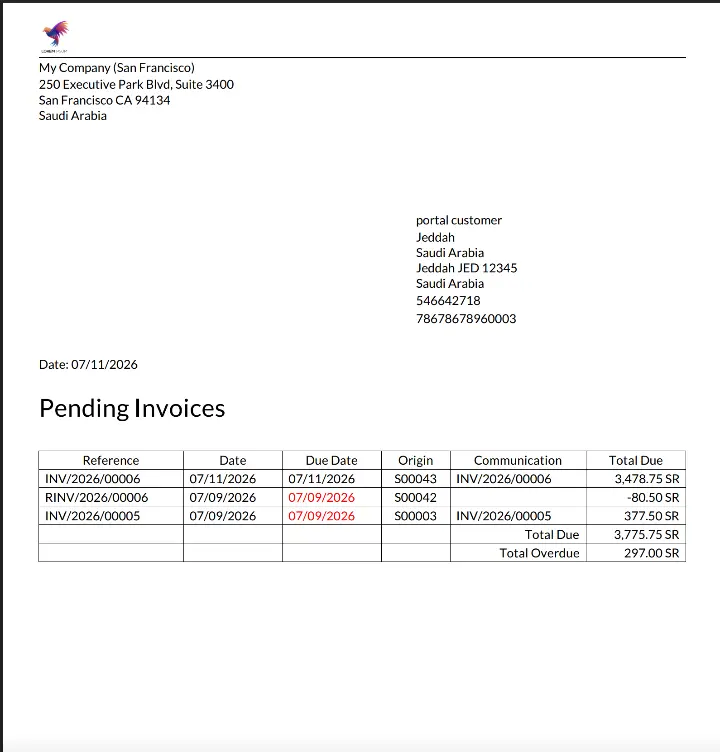
Customers can download their complete account statement directly from the portal at any time, providing full visibility of outstanding balances and transaction history.
Order & Shipment Tracking
Customers can monitor the status of their sales orders and shipments in real time. They can also communicate directly with your sales team through the portal by sending inquiries or support requests.

Invoices & Online Payments
Customers can view and download all confirmed sales invoices and securely pay outstanding invoices online using the available payment methods.


Returns & Refund Requests
Customers can submit return or refund requests directly through the portal. Each request is routed through a review and approval workflow, ensuring a transparent and efficient after-sales service experience.

Credit Limit Control
Customer-specific credit limits are automatically enforced during checkout. Customers can view their available credit, and orders exceeding the approved limit can be blocked or routed for approval.

Any Device. Anywhere. Anytime.
Your customers can access the portal from their desktop, tablet, or smartphone to place orders, track deliveries, view invoices, and manage their accounts wherever they are.
 /
/